
Autorun Remover With Key

Does your antivirus can't remove the autorun& autorun.inf virus in your system or USB storage device completely? Or even they can't detect the virus? Autorun& autorun.inf virus is a new kind of virus/trojan, most of common antivirus products such as Kaspersky, Nod32, Avast, AVG can do little about this kind of virus/trojan. Autorun Virus Remover uses proactive technology to permanently remove autorun& autorun.inf viruses, also it can block any autorun/autorun.inf viruses trying to infect the system via USB drives(pendrive, external hard disk, iPod, etc). What you need to do is just clicking the scan button of Autorun Virus Remover.


Features:


  • Permanently remove autorun virus in your system and USB drives.
  • Prevent autorun virus infecting computer from USB drives.
  • Prevent data leak via USB storage devices.
  • The best solution to protect offline computerCompatible with other antiviruses.
  • No recurring payment, the license key is lifetime.

Screen-shot:
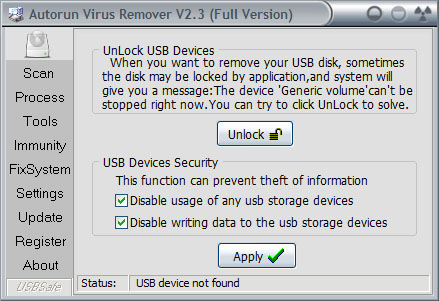


Key:

Username:DS
Serial key:HY

Download Link:Click Here (link updated)

Comments

Popular posts from this blog

How to hide photos and videos in android phone without using any software

To do this your mobiles file manager should have a option called ' create a file  ' else download file manager called EsFile manager . First add videos and photos which has to be hidden in a folder and click add icon and choose create a file option and name it as .nomedia and press save . That's it now the photos and videos in that specific folder will hidden in gallery and in media players .

Volume Ace Free - The Best Profile Management App

Volume ace is one of my best android app for managing the profiles , its a free version you can download on Play Store . After download and installation open the app and create a profile by clicking the three longitudinal dots at top right corner and choose the option Add Profile , after creating a profile customize the profile according to your wish and save it . You can create maximum number of profiles according to your need  and can be easily switch between the profiles. It has a option called Timer  it is used to set a specific profile for specific period of time [ For example: when you are in meeting and meeting will over  after an hour you can set silent profile for one hour, after one hour silent profile will switched to normal profile automatically ]. It also has option called scheduler   it is used to schedule your selected profile .By enabling option called vibrate on schedule in setting it will vibrate once will switching the profiles [ For example:...

How to block website on your pc without any software

C:\WINDOWS\system32\drivers\etc\hosts                                                    Feel Free To Comment